

Are you torn between choosing Skylum Luminar AI vs DxO PhotoLab for your photo editing needs? In this comprehensive comparison, we’ll delve into the key differences between these two advanced editing tools to help you make an informed decision. From user interface and editing capabilities to pricing and customer support, we’ll explore every aspect to guide you towards the right choice for your editing workflow. Whether you’re a beginner seeking simplicity or a professional striving for technical excellence, read on to discover which software best suits your requirements.
User Interface and Ease of Use: Skylum Luminar AI vs DxO PhotoLab
Skylum Luminar AI
Skylum Luminar AI boasts a sleek, modern user interface designed to make photo editing accessible to everyone, regardless of experience level. The layout is intuitive, with a clean design that prioritizes ease of use. The tools are neatly organized in a sidebar, allowing users to quickly find and apply various effects and adjustments. The AI-driven features, like sky replacement and portrait enhancements, are prominently displayed, making it simple for users to apply powerful edits with just a few clicks. Overall, Luminar AI’s interface is user-friendly and designed to minimize the learning curve.
DxO PhotoLab
DxO PhotoLab, on the other hand, offers a more traditional, professional-grade interface. It might feel a bit overwhelming for beginners due to its extensive range of features and tools. However, for experienced photographers, this complexity translates to greater control and precision. The interface is highly customizable, allowing users to set up their workspace according to their preferences. The sidebar includes comprehensive tool options, from basic adjustments to advanced corrections. Despite its initial complexity, DxO PhotoLab provides a robust and powerful environment for detailed photo editing.
Editing Features and Capabilities: Skylum Luminar AI vs DxO PhotoLab
Skylum Luminar AI
When it comes to editing features and capabilities, Skylum Luminar AI leverages artificial intelligence to simplify complex tasks. Key features include AI Sky Replacement, AI Structure, and AI Augmented Sky, which automate and enhance various editing processes. These tools allow users to achieve professional-level edits quickly. Additionally, Luminar AI offers a range of filters and presets that can be customized to fit any photo. The software also supports layer-based editing, giving users the flexibility to make non-destructive adjustments.
DxO PhotoLab
DxO PhotoLab shines with its advanced editing capabilities, particularly in the realm of RAW processing and lens correction. It features DxO’s renowned Optics Modules, which automatically correct lens distortions, vignetting, and chromatic aberrations based on camera and lens profiles. The software also includes powerful noise reduction technology (DeepPRIME), which significantly enhances image quality, especially in high-ISO shots. DxO Smart Lighting and ClearView Plus are standout features that improve dynamic range and reduce haze, respectively. While not as focused on AI-driven ease of use, DxO PhotoLab offers a depth of control that professionals will appreciate.
RAW Processing and Image Quality: Skylum Luminar AI vs DxO PhotoLab
Skylum Luminar AI
Skylum Luminar AI provides solid RAW processing capabilities, but its strength lies in its AI-powered enhancements rather than technical RAW adjustments. The software supports a wide range of RAW formats and allows users to perform essential adjustments like exposure, contrast, and white balance. However, Luminar AI is particularly notable for its AI tools that quickly enhance image quality, making it an excellent choice for photographers looking to achieve impressive results with minimal manual adjustments.
DxO PhotoLab
DxO PhotoLab is renowned for its exceptional RAW processing and image quality enhancements. The software’s DeepPRIME noise reduction technology is one of the best in the industry, effectively reducing noise while preserving detail, even in high-ISO images. DxO’s Optics Modules provide automatic corrections tailored to specific camera and lens combinations, ensuring optimal image quality. Additionally, DxO Smart Lighting intelligently balances exposure across the image, enhancing dynamic range and bringing out details in both shadows and highlights. For photographers who prioritize the highest possible image quality, DxO PhotoLab offers unparalleled tools and capabilities.
Pricing and Value for Money: Skylum Luminar AI vs DxO PhotoLab
Skylum Luminar AI
When evaluating the pricing and value for money of Skylum Luminar AI versus DxO PhotoLab, it’s clear that both offer unique advantages tailored to different types of users. Skylum Luminar AI adopts a straightforward pricing model with a one-time purchase cost, eliminating the need for ongoing subscription fees. As of 2024, Luminar AI is priced at approximately $49/ month for a single license. This pricing includes lifetime updates within the same version, making it a cost-effective option for those who prefer not to commit to recurring payments. Additionally, Skylum often provides discounts and bundle offers, enhancing its value proposition.
Luminar AI’s value is significantly boosted by its AI-driven features, which automate and simplify complex editing tasks. This makes it an excellent choice for photographers who want powerful editing tools without the steep learning curve. The combination of a one-time purchase price and the inclusion of advanced AI tools makes Skylum Luminar AI a compelling choice for both hobbyists and professionals seeking efficient, high-quality photo editing software.

DxO PhotoLab
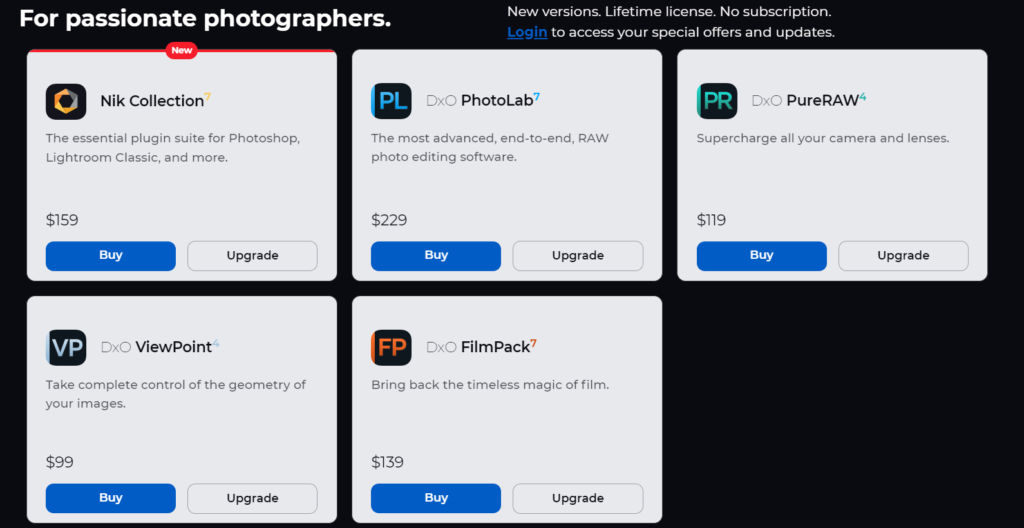
DxO PhotoLab, on the other hand, operates on a different pricing model, offering both one-time purchase and subscription options. The one-time purchase of DxO PhotoLab Essential Edition is priced at approximately $99, while the Elite Edition, which includes advanced features like DeepPRIME noise reduction and DxO’s Optics Modules, costs around $229. These prices include free updates within the purchased version but do not cover major version upgrades, which may require additional costs.
For those who prefer a subscription model, DxO PhotoLab offers annual plans, which can be more economical if users prefer access to the latest updates and features without a large upfront investment. The subscription pricing varies, typically around $99 per year for the Elite Edition. This flexibility allows users to choose a payment structure that best fits their needs and budget.
DxO PhotoLab’s higher price point is justified by its superior RAW processing capabilities, extensive lens correction profiles, and professional-grade editing tools. Photographers who demand the highest image quality and precise control over their edits will find that DxO PhotoLab offers excellent value for money despite the higher initial cost.
AI and Automation: Skylum Luminar AI vs DxO PhotoLab
Skylum Luminar AI
When comparing Skylum Luminar AI vs DxO PhotoLab, one of the most striking differences is the extent and sophistication of AI and automation features. Skylum Luminar AI is designed around leveraging artificial intelligence to simplify and enhance the photo editing process. Its AI-driven tools are a standout feature, aimed at both speeding up workflows and delivering impressive results with minimal manual intervention.
Key AI features in Luminar AI include:
- AI Sky Replacement: Automatically detects and replaces skies in photos, adjusting lighting and colors to create seamless blends.
- AI Structure: Enhances details in photos without affecting people or other objects, selectively improving textures and clarity.
- AI Augmented Sky: Allows users to add elements such as birds, clouds, or even planets to the sky in their photos, automatically integrating them into the scene.
- AI Portrait Enhancer: Automatically improves facial features, including skin smoothing, eye brightening, and teeth whitening, making portrait editing quick and efficient.
These AI tools are designed to deliver high-quality edits quickly, making Skylum Luminar AI an excellent choice for photographers who want to achieve professional results with less manual effort. The focus on automation and ease of use means that even beginners can produce stunning images without extensive editing knowledge.
DxO PhotoLab
While DxO PhotoLab also incorporates automation, its approach is more focused on enhancing technical precision and image quality rather than leveraging AI to the same extent as Luminar AI. DxO PhotoLab’s automated features are geared towards optimizing the photo development process, particularly through its advanced correction tools.
Key automation features in DxO PhotoLab include:
- DxO Optics Modules: Automatically applies lens corrections based on detailed profiles for specific camera and lens combinations, correcting distortions, vignetting, and chromatic aberrations.
- DxO Smart Lighting: Automatically adjusts exposure to balance highlights and shadows, improving overall dynamic range and detail in photos.
- ClearView Plus: Enhances clarity and reduces haze in landscape photos with a single click, improving image contrast and detail.
- DeepPRIME Noise Reduction: Uses AI to perform exceptional noise reduction, especially effective for high-ISO images, while preserving fine details and textures.
These automated features in DxO PhotoLab are designed to enhance the technical aspects of photo editing, ensuring high-quality results with minimal manual adjustments. While it may not offer the same range of creative AI tools as Luminar AI, its focus on precision and quality makes it ideal for photographers who prioritize technical excellence.
By comparing the AI and automation capabilities of Skylum Luminar AI vs DxO PhotoLab, it becomes clear that each software offers unique advantages. Luminar AI excels in creative and user-friendly AI tools that streamline the editing process, while DxO PhotoLab provides automated technical corrections that ensure superior image quality. Choosing between the two will depend on whether users prioritize creative enhancements or technical precision in their photo editing workflows
Customer Support and Community: Skylum Luminar AI vs DxO PhotoLab
Skylum Luminar AI
When comparing Skylum Luminar AI vs DxO PhotoLab in terms of customer support and community, both platforms offer valuable resources, but with distinct differences.
Customer Support: Skylum Luminar AI provides comprehensive customer support options to assist users. These include:
- Help Center: A detailed online repository of articles, guides, and FAQs that cover a wide range of topics from installation to advanced editing techniques.
- Email Support: Users can contact the support team via email for personalized assistance. Response times are generally quick, and the support staff is knowledgeable and helpful.
- Live Chat: Available on the Skylum website, live chat offers immediate assistance for urgent queries.
- User Manual: An extensive manual that provides step-by-step instructions and detailed explanations of features.
Community: The Skylum Luminar AI community is active and supportive, offering several platforms for users to connect and share knowledge:
- Luminar Insiders: An official community platform where users can share their work, participate in discussions, and access exclusive content and webinars.
- Social Media: Skylum has a strong presence on social media platforms like Facebook, Instagram, and YouTube, where users can find tutorials, tips, and engage with other Luminar AI users.
- Forums and Groups: Numerous user-created forums and Facebook groups where Luminar AI enthusiasts can ask questions, share tips, and showcase their edits.
DxO PhotoLab
DxO PhotoLab also offers robust customer support and has an engaged community, catering especially to users who seek technical precision and advanced editing capabilities.
Customer Support: DxO PhotoLab’s customer support services include:
- Support Center: An extensive collection of articles, tutorials, and FAQs that address common issues and provide in-depth guidance on using DxO PhotoLab’s features.
- Email Support: Personalized assistance via email, where users can submit tickets for specific problems or questions. The support team is known for their expertise and prompt responses.
- User Manual: Detailed documentation that helps users navigate and utilize the full potential of DxO PhotoLab.
- Webinars: Regularly scheduled webinars and live training sessions that provide valuable insights and tips from DxO experts.
Community: The DxO PhotoLab community is known for its technical expertise and active participation:
- DxO Forums: An official forum where users can discuss features, troubleshoot issues, and share their experiences with DxO PhotoLab. This is a great resource for getting advice from experienced users and DxO staff.
- Social Media: DxO maintains an active presence on platforms like Facebook, Twitter, and YouTube, offering tutorials, updates, and a platform for users to connect.
- Third-Party Forums and Groups: Numerous photography forums and online groups where DxO PhotoLab users gather to exchange tips, techniques, and showcase their edited photos.
By comparing the customer support and community aspects of Skylum Luminar AI vs DxO PhotoLab, it is clear that both platforms provide strong support and vibrant communities. Skylum Luminar AI’s focus on user-friendly support and creative engagement complements DxO PhotoLab’s emphasis on technical expertise and detailed guidance. Users can feel confident that, regardless of their choice, they will have access to ample resources and a supportive community to enhance their photo editing journey.
Conclusion: Skylum Luminar AI vs DxO PhotoLab
In conclusion, the comparison between Skylum Luminar AI and DxO PhotoLab reveals two powerful photo editing software options, each with its own strengths and advantages.
Skylum Luminar AI impresses with its user-friendly interface, extensive AI-driven features, and creative editing tools. It is well-suited for photographers of all skill levels who prioritize efficiency and creativity in their editing process. With a one-time purchase model and a vibrant community, Luminar AI offers excellent value for money and a supportive environment for users to explore and expand their editing skills.
DxO PhotoLab, on the other hand, shines with its exceptional RAW processing capabilities, precise lens corrections, and advanced technical features. It caters to photographers who demand the highest image quality and require detailed control over their edits. While DxO PhotoLab may have a steeper learning curve, its comprehensive support resources and active community ensure that users have the tools and guidance they need to achieve professional-level results.
Ultimately, the choice between Skylum Luminar AI and DxO PhotoLab depends on individual preferences, editing goals, and workflow requirements. Those seeking a user-friendly and creative editing experience may find Skylum Luminar AI to be the ideal solution, while photographers prioritizing technical precision and image quality may gravitate towards DxO PhotoLab.
Regardless of which software you choose, both Skylum Luminar AI and DxO PhotoLab offer powerful tools and a supportive ecosystem to help you unleash your creativity and elevate your photo editing endeavors. We hope this comparison has provided valuable insights to assist you in making an informed decision for your editing needs.
Are you interested in learning a second language online? If so, check out the below link for more information.https://www.rocketlanguages.com/pricing?language=spanish
To know more about email marketing tools you can check email marketing tools.


Informative post
useful post
Great insight on online language learning
Thanks for informative post
If some one needs to be updated with most up-to-date technologies therefore he must be pay a
quick visit this website and be up to date everyday. https://Bandurart.Mystrikingly.com/
If some onne needs to bbe updated with most up-to-date technologies therefore he must be pay a quick visit this website
and be up to date everyday. https://Bandurart.Mystrikingly.com/